블로그 · 2022년 10월 30일 · 읽기 1분
Next.js에서 Styled-components 적용하기

문제
styled-components
yarn add styled-components @types/styled-components
를 진행 했지만 새로고침 즉 새로고침시 스타일이 적용 안되는 문제가 발생.
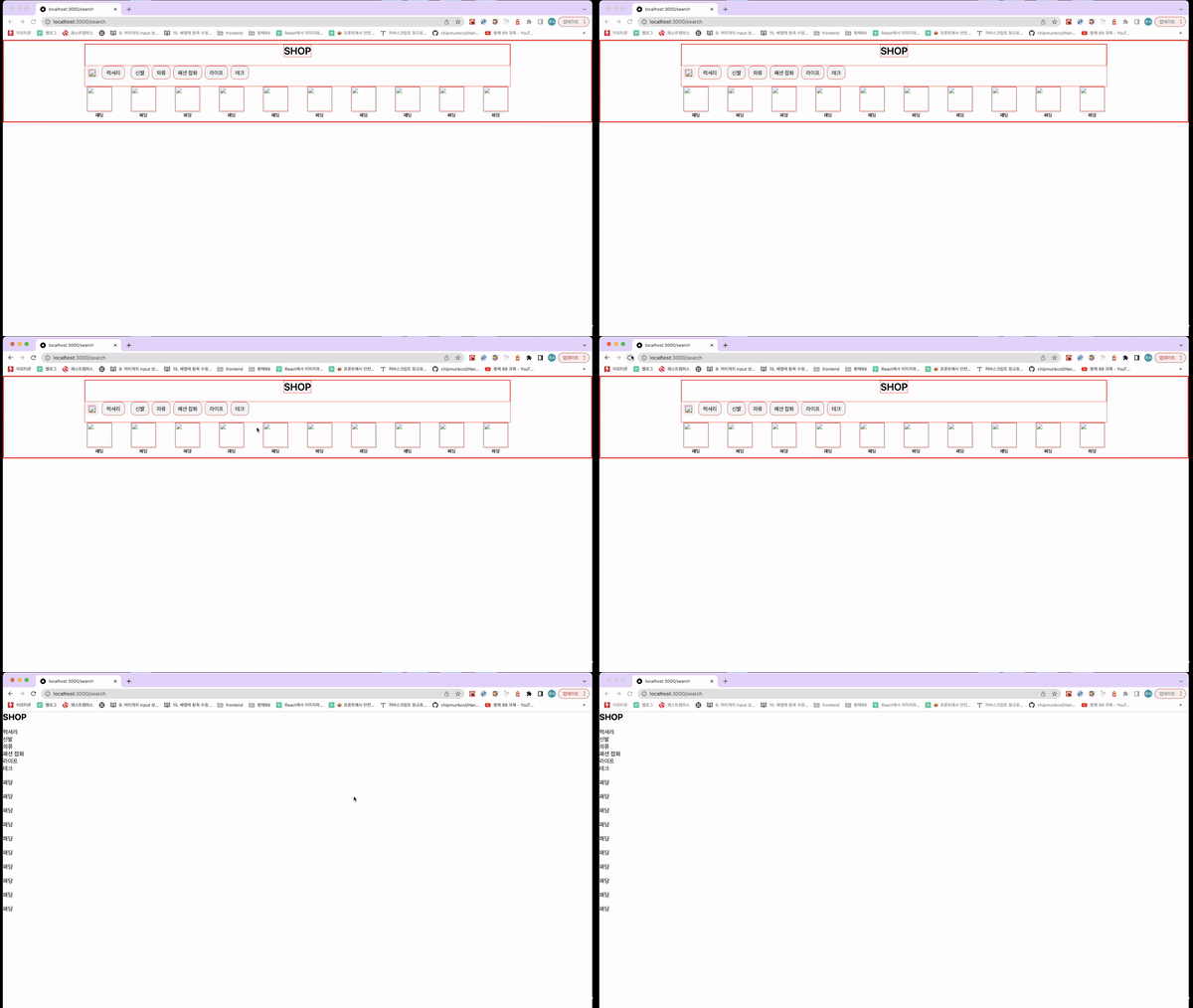
해결
1 Step 바벨 플러그인 설치
yarn add -dev babel-plugin-styled-components
.babelrc
{ "presets": [ "next/babel" ], "plugins": [ [ "babel-plugin-styled-components", { "fileName": true, "displayName": true, "pure": true } ] ] } fileName : 코드가 포함된 파일명을 알려줌 displayName : 클래스명에 해당 스타일 정보 추가 pure : 사용하지 않은 속성 제거
최초 SSR 이후 CSR로 라우팅을 하게 되는데, 이 때 서버에서 생성하는 해시값과 브라우저에서 생성하는 해시값이 서로 달라서 에러가 발생하게 된다. (Prop className did not match) 이를 해결하기 위해 바벨 플러그인을 설치해주었다.
2 Step CSS가 적용되지 않고 먼저 렌더링되는 에러 수정
_document.tsx
import Document, { Html, Head, Main, NextScript, DocumentContext, } from "next/document"; import { ServerStyleSheet } from "styled-components"; class MyDocument extends Document { static async getInitialProps(ctx: DocumentContext) { const sheet = new ServerStyleSheet(); const originalRenderPage = ctx.renderPage; try { ctx.renderPage = () => originalRenderPage({ enhanceApp: (App) => (props) => sheet.collectStyles(<App {...props} />), }); const initialProps = await Document.getInitialProps(ctx); return { ...initialProps, styles: ( <> {initialProps.styles} {sheet.getStyleElement()} </> ), }; } finally { sheet.seal(); } } render() { return ( <Html> <Head> // 생략 </Head> <body> <Main /> <NextScript /> </body> </Html> ); } } export default MyDocument;
styled-component를 사용할 경우 커스텀이 필요하다. https://styled-components.com/docs/advanced#nextjs 해당 코드를 추가해주어야 SSR시에 styled가 헤더에 주입된다. 추가해주지 않으면 CSS가 적용되지 않고 먼저 렌더링되는 현상이 발생한다. 생략부분에는 메타태그를 넣어주거나 웹폰트를 preload 시켜줄 수 있다.
3 Step 전역 스타일링 하기
yarn add styled-reset
global-styles.ts
import reset from 'styled-reset' import { createGlobalStyle } from 'styled-components' const GlobalStyle = createGlobalStyle` ${reset} * { box-sizing: border-box; } body{ font-family: -apple-system,system-ui,BlinkMacSystemFont, "Segoe UI",Roboto,"Helvetica Neue",Arial,sans-serif; } a { color: inherit; text-decoration: none; } input, button { background-color: transparent; border: none; outline: none; } h1, h2, h3, h4, h5, h6{ font-family:'Maven Pro', sans-serif; } @media only screen and (max-width: 768px) { body { font-size: 12px; } } @media only screen and (max-width: 576px) { body { font-size: 10px; } } ` export default GlobalStyle
_app.tsx
import type { AppProps } from "next/app"; import Head from "next/head"; import { ThemeProvider } from "styled-components"; import { GlobalStyle } from "../styles/global-style"; import { theme } from "../styles/theme"; function MyApp({ Component, pageProps }: AppProps) { return ( <> <Head> <meta name="viewport" content="width=device-width, initial-scale=1" /> <title>boilerplate</title> </Head> <GlobalStyle /> <ThemeProvider theme={theme}> <Component {...pageProps} /> </ThemeProvider> </> ); } export default MyApp;
추가로 전역스타일링을 적용했다.